

OPERA by Oracle is a robust property management system for hotels of any size, enabling them to centralize control over all operations and deliver a better customer experience, both online and offline.

Watch our detailed overview of property management systems to learn more
OPERA's history began back in the 1970s when it was known as Micros. Throughout its history (both before and after it was bought by Oracle and renamed), OPERA was the PMS of choice for Marriott, Four Seasons, Hyatt, Radisson, and more hospitality leaders. According to 2023 estimates, around 40,000 hotel properties use OPERA PMS.
In this article, we will explain how hoteliers and hospitality technology vendors can set up an integration between OPERA PMS and third-party hotel solutions.
Property management ecosystem: types of PMS integrations
Why do you need third-party integrations in the first place? Isn’t one software enough? Sadly, no. In a perfect world, a hotel goes directly to the PMS provider, gets the software, and lives happily ever after. But in reality, one product can’t satisfy all hoteliers' needs.
The future of hospitality is in connectivity. The changing distribution market, constantly shifting customer expectations, and alternative hospitality options all make it harder to grow and compete. So, both hospitality technology vendors and hoteliers themselves have been interested in building the system up with modern integrations.
Let’s go through the main features (modules) a modern hotel should cover in a PMS.

The infrastructure of hotel software
Reservations management. Also called a central reservation system, this module stores inventory, dates, and availability, and exchanges this data between distribution channels, a channel manager, and your internal system.
Front desk management. Mostly used for check-ins and room management, the front desk software has an overview of room status, processes payments, and operates the self-service kiosks.
Channel manager integration. While channel management software usually exists outside of a PMS, it should be tightly integrated with it. It synchronizes reservation data between many distribution channels, keeping information up to date and preventing overbooking.
Revenue management. Automated or manual, the task of revenue management (or predicting an optimal hotel room price) is crucial for enabling a hotel to grow and stay competitive. The RM module uses data from other integrated systems to deliver relevant price calculations and automatically update them across the channels.
Housekeeping and maintenance. Often augmented with staff mobility options, this system allows front-office staff to assign tasks to housekeepers, who can respond promptly and communicate easily.
Customer relationship management (CRM). This hotel-specific CRM system records guest preferences, their loyalty program growth, and manages pre- and post-stay services.
Reporting and analytics. Data from all other systems can pour into automated hotel analytics reports, allowing you to track metrics, analyze performance, and make informed business decisions.
Back office management. Internal admin tasks are operated in the back office. This is where you set employee shifts, manage marketing activities, keep inventory up to date, and do everything else to ensure the hotel runs like a well-oiled machine.
Point-of-sale services. When guests pay for any services outside of their reservation, all transactions should be recorded and processed by a hotel POS system. Integration with guest management and the back office allows you to keep track of your F&B stock, invoice guests, and report revenue from these additional monetization channels.
Even if many of these features exist in a core OPERA PMS, it’s not necessarily the best choice on the market. Oracle admits this by opening several possibilities for integration with its systems and custom development. In the rest of the article, we will explain the integration possibilities.
Understanding Oracle Hospitality software
Oracle is a multibillion-dollar technology provider with a wide selection of software and hardware products in numerous industries. The full set of Oracle hotel management systems is provided under the Oracle Hospitality umbrella. This includes two versions of PMS software (legacy OPERA 5 and modern OPERA Cloud) and a set of guest services called Suite8.
There are two options for independent software vendors who want to build integrations to Oracle Hospitality products:
- approval-based Oracle Hospitality Partner Integration Program used for integrating legacy solutions OPERA 5 and Suite8, and
- self-service Oracle Hospitality Integration Platform (OHIP) – an API-centric platform designed for OPERA Cloud.
To use the partner program, you must be reviewed by Oracle and pass their criteria. With OHIP, vendors can get around API capabilities without assistance.
But before learning what’s available, let's look in detail at the different PMS products Oracle provides.
OPERA 5
OPERA 5 is an older system designed for small, mid-size, and multi-property hotel operations. It is available as on-premise or self-hosted software and supports integration with other Oracle Hospitality applications and third-party systems.
If you choose the self-hosted option, you can store the system in a private cloud (provided by Azure, Amazon Web Services, Google Cloud, etc.), which makes sense for multi-property hotel groups.
Core functions include
- reservations,
- guest profile management,
- check-in and check-out,
- room assignment,
- room inventory management,
- housekeeping,
- maintenance,
- cashiering,
- billing,
- accounts receivable,
- commissions,
- reporting, and
- back-office export.
The system also supports casino comp accounting and configurable quick keys.
The platform integrates with Oracle Hospitality food and beverage, point-of-sale, and kitchen management systems for unified billing and reporting.
Mobile functionality allows staff to perform tasks such as check-in, housekeeping, and maintenance using mobile devices.
OPERA 5 interface opened on the Meeting Room management tab. Source: Docs.Oracle
Three packages are available: Lite (30 functions), Standard (55 functions), and Premium (unlimited functions).
OPERA Cloud
OPERA Cloud is a cloud-native system designed for hotels, resorts, casinos, and hotel groups. It’s available via a web browser and deployed and maintained by Oracle. Like OPERA 5, it manages reservations, guest profiles, front-desk operations, housekeeping, rates, billing, payments, and reporting. But there’s more.
- Compared to OPERA 5, OPERA Cloud significantly simplifies integrations through REST APIs, centralized identity management, and self-service developer tooling. The list of third-party integrations includes mobile apps, guest messaging platforms, payment systems, CRM tools, loyalty systems, and revenue management solutions.
- Being device-agnostic, OPERA Cloud can run on mobile devices all around the property, such as employee smartphones and self-service, customer-facing tablets.
- OPERA Cloud supports centralized updates, cloud security management, continuous feature releases, push notifications, and remote access.
- The platform enables customized operations in 20 languages and allows hotels to meet fiscal compliance requirements in more than 200 countries.
- Compared to OPERA 5, the cloud version, with its modern user interface developed according to today’s design principles, makes the system easier to learn and use.

OPERA Cloud dashboard Source: Oracle
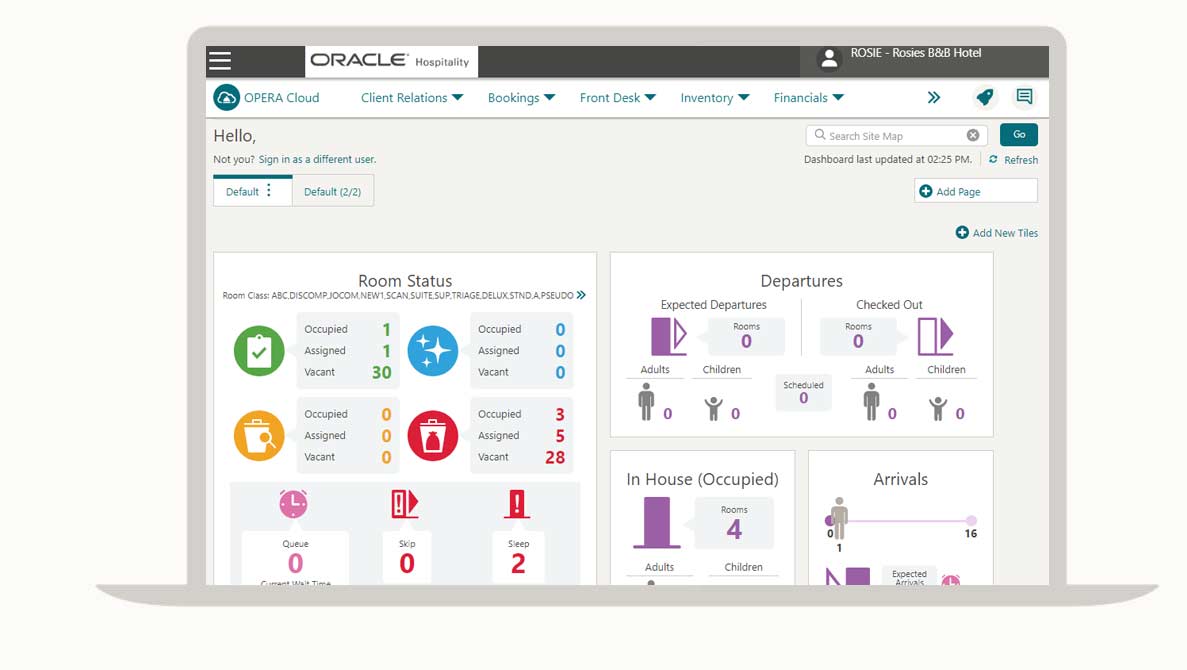
OPERA Cloud is also tightly integrated with Oracle MICROS Simphony Cloud POS, a restaurant and food-and-beverage point-of-sale platform, enabling room-charge posting, shared guest profiles, centralized billing, mobile ordering, and self-service workflows across hotel and F&B operations.
Suite8
Suite8 is a set of guest services combined in a single software. It’s available only in the EMEA (Europe, the Middle East, and Africa) and the Asia-Pacific regions and augments the existing OPERA PMS capabilities.
This includes such features as
- a booking engine webConnect that allows guests to book rooms and other services on a hotel’s website,
- leisure management for booking spa and leisure appointments,
- a conference and catering system for managing events and banquets,
- loyalty and membership management for defining different loyalty types,
- a point-of-sale system integrated with restaurants, bars, minibars, etc.
Now, let’s go through two types of integrations and explain how they work.
Integration with OPERA 5 and Suite8
There are two API sets within the partner program: a general API between PMS and external systems and a kiosk API for connecting PMS with kiosk software. There is also an additional integration stack, serving specific operational purposes.
OPERA Web Services (OWS)
OWS is a legacy SOAP-based web service layer used for XML data exchange between external applications and OPERA 5. It lets customers use the search and booking options on a hotel’s website and helps hotel staff administer loyalty membership information or access room information. The API supports the following functionality.
Availability management. The API will return real-time availability information, including meeting room availability data.
Room management. You can update room status and create a room maintenance schedule.
Customer management. Update customer profiles, retrieve past reservations, apply membership benefits, create and cancel bookings, etc.
Extra services. Request and send hotel brochures, authenticate users, and create and update vacation ownership contracts.
The whole list of web service specifications is available here.
OPERA Kiosk
OPERA Kiosk is a SOAP API that connects hotel kiosk applications with OPERA PMS, enabling guest self-service functions such as check-in and check-out.

Kiosk interface configurations. Source: Docs.Oracle
Configurable features include
- unassisted check-in/check-out,
- advance billing during check-in,
- third-party credit card authorization,
- reservation and folio display,
- name validation,
- payment method configuration,
- room assignment,
- walk-in processing, and
- kiosk-based key handling.
Read more about OPERA Kiosk Interface configurations here.
Other interfaces for specific operations
Beyond OWS and the Kiosk Interface, the OPERA 5 and Suite8 ecosystem relies on additional integration stacks, each serving a specific operational purpose.
OPERA Exchange Interface (OXI). It is middleware (orchestration infrastructure) used mainly by hotel groups and enterprise environments. It manages message routing and synchronization between OPERA PMS and systems such as CRSs, channel managers, revenue management platforms, and other PMS deployments.
OХI utilizes asynchronous XML messaging based on data standards such as HTNG and Open Travel.
OPERA Hotel Interface (IFC8) & FIAS Protocol. This stack is dedicated to local hardware within the physical hotel property: door lock systems, telephony (PBX), Guestroom Entertainment/IPTV, minibars, and Building Management Systems (BMS). It uses the proprietary FIAS (Fidelio Interface Application Specification) protocol – a synchronous, stream-based protocol designed for near-instant commands, such as encoded keycard generation.
How to integrate OPERA 5 and Suite8
Integrating with OPERA 5 as a vendor is a formal, multi-step journey that requires a mix of legal, financial, and technical commitments.
1. Access SOAP documentation and WSDLs. For vendors: To build integrations, vendors must join the Oracle Partner Network (OPN) ($500/year) and accept Oracle’s partner agreements. For OPERA 5 / Suite8, vendors must join the Oracle PartnerNetwork (OPN) and subscribe to the "License & Hardware" track ($3,000/year), in addition to the base OPN membership fee. You can see the list of applicable fees here. Oracle may also require a hotel customer ready to justify the integration.
For hotels: Access is managed through Oracle Support.
2. Test APIs and build an application. Note that integration cannot be tested on production systems. Vendors must use
- Oracle-provided demo or lab environments, or
- a hotel’s non-production (UAT/staging) OPERA environment.
Because OPERA 5 is often on-premise, connectivity may require VPN access or IP whitelisting for the hotel server.
3. Certificate and validate. Before production use, Oracle validates the integration to ensure
- data security (no PII leakage),
- system stability and performance, and
- correct use of APIs and schemas.
Validation costs $7,000 – $15,000 (one-time). Some programs also require certified personnel (implementation/support roles), depending on partner status.
Now, if you want to integrate with OPERA Cloud, you will find it easier as Oracle has created a self-service platform for you to do so.
Oracle Hospitality Integration Platform (OHIP) for OPERA Cloud
The Oracle Hospitality Integration Platform (OHIP) is a centralized, self-service portal for hoteliers using OPERA Cloud to connect to REST APIs from the marketplace and for third-party vendors to integrate with OPERA products. OHIP covers most functionality previously exposed through OWS and parts of OXI/Kiosk integrations, while some legacy operational and membership-related functionality still remains tied to older interfaces.
OHIP’s primary advantage over legacy OXI/OWS is the use of Streaming APIs (WebSockets). This allows third-party systems to receive real-time "Business Events" (like a guest check-in) without the latency or overhead of constant database polling.
Developers can use the platform to
- search for available APIs,
- discover which API resources are available,
- register applications to access API keys in both production and non-production environments,
- manage their applications and APIs subscribed to them, and
- view gateway information and copy the gateway URL.

OHIP offers capabilities both for accessing APIs and safely publishing them
Let’s review APIs and explore how you can access them.
- Activity API for overseeing account management operations such as appointments, sales calls, contacts.
- Block Reservation API for managing groups of rooms occupied by guests who attend an event (conference, wedding, etc.)
- Customer Relationship Management API for managing guest profiles.
- Event Management API for managing catering activities.
- Front Desk operations API for managing guest arrivals and departures, sending guest messages, operating housekeeping tasks, and more.
- Housekeeping API for scheduling cleaning and updating room status.
- Inventory API for updating item inventory.
- Price Availability Rate API for managing room inventory, availability, setting room sell limits, etc.
- Rate API to define and manage rate structures, as well as promotions.
- Reservation API for creating and updating reservations.
- Accounts Receivable API for managing debtors’ accounts, invoices, and remittance.
- Cashiering API for access to guest receipt histories, credit card settlements, etc.
- Channel Configuration API for administering distribution channels (basically performing Channel Manager functions).
- Leisure Management API for accessing the leisure management functions of OPERA Cloud.
How to integrate with OPERA Cloud using OHIP
Read the full documentation for Oracle Hospitality Integration Platform here. But look at the summary of the steps to see how easy it is.
1. Access the developer portal. For vendors: Join the Oracle Partner Network (OPN) ($500 yearly) and request the "Hospitality" expertise track (no additional fee). Once approved, you will receive credentials for the Oracle Hospitality Developer Portal.
For hotels: Access is self-service. The OPERA Cloud administrator can grant "Integration Manager" roles via the Identity Management portal, allowing you to log in to the developer portal with your existing OPERA credentials.
2. Discover and test APIs. Explore the API Catalog, which includes over 3,000 REST endpoints. Oracle has made the REST API specifications for OHIP available as an open-source project on GitHub. This allows developers to generate their own SDKs in languages like Python, Java, or C# without waiting for Oracle.
3. Create and register an application. You can create a "non-production" application to get your app key. Use this for development against Oracle’s sandbox environments. To go live, create a "production" application. You will need to provide your OPN ID and a business justification. Once approved, you will receive a production app key.
4. Authenticate and call APIs. A hotel administrator should give you access to their integration username and password, which is where you obtain the OAuth token. To call for APIs, use your OAuth token, the application key, and the hotel’s ID in the system, and you’re good to go.
Unlike legacy OPERA 5 integration, validation is optional.
OPERA integration challenges and how to address them
Oracle did a pretty good job of easing the integration with their OHIP product. But if you’re building connectivity with Opera 5, you will experience some struggle.
Getting accepted to the Partner Integration Program. You won’t be able to use OPERA Web Services or Kiosk APIs without some criteria compliance. You must have an existing product, be compliant with the PCI security standard, have an active sales channel, and more. The application form has a full list. Additionally, the validation team may take weeks to respond, so you won’t be able to effectively plan the integration or even use the sandbox environment.
Complying with hospitality data standards. HTNG and OpenTravel standards were created specifically to promote interoperability in hospitality software. While they benefit the industry, they also create an additional step in software development — vendors first need to study these standards, apply them to their own APIs, and only then be ready for integration.
Slow transition to cloud. Oracle actively encourages its OPERA 5 users to transition to OPERA Cloud. But given their continued support for legacy systems, many of their customers choose to stay. This means that independent software vendors would have to create integrations for both versions if they want to reach a large chunk of customers.